
Apple kills $999 MacBook Air and 12-inch MacBook
Apple upgraded its newest MacBook Air and MacBook Pro laptops on Tuesday, but it looks like two notebooks have vanished from the company's site. The smallest of the MacBooks and the cheapest MacBook Air are now gone.
The $999 MacBook Air and 12-inch MacBook are no longer available on Apple's website as of Tuesday. It appears the company's $1,099 MacBook Air and 13-inch MacBook Pro are the new entry-level notebooks.
That effectively raises the entry cost of buying a Mac by $100, part of a broader trend by Apple to hike up prices throughout its product lines, from the iPad to the iPhone. The removal of the two laptops also streamlines the Mac lineup, offering a simpler, albeit more expensive, set of options for consumers.
Apple says the $999 MacBook Air will still be available via its Education Institution store.
Though the iPhone continues to generate the vast majority of Apple's revenue, the Mac in its various guises has grown to be the company's No. 2 hardware line, having surpassed flagging sales of the iPad.
First released in 2015, the now "classic" 13-inch MacBook Air was the default low-cost option and a favorite of college students and young professionals. The thin laptop received annual updates until 2017, with improvements to its Intel processor, while Apple maintained the sub-$1000 price tag.
But the MacBook Air received few design changes over the years even as PC makers raced to build thinner, sleeker laptops. The computer still lacked a Retina Display as other PCs rocked high-definition and 4K screens.
The new MacBook Air, like the refreshed MacBook Pro line, hasn't been without its controversies. Its new keyboard, with its more shallow "butterfly switches" were more prone to damage and didn't offer the same tactile experience as previous iterations. Apple said new MacBook Air and MacBook Pro units would come with a new third-generation keyboard that will supposedly address those issues.
Apple's 12-inch MacBook, meanwhile, also made its debut in 2015 and received updates for the following two years. The laptop served as a tweener, smaller and less powerful than the Pro line but more expensive than the Air lineup. It controversially was the first to incorporate just a single USB-C port, forcing most people to use a dongle if they wanted to connect multiple peripherals.
The more powerful 2018 MacBook Air effectively rendered the MacBook irrelevant.
Google searches for either MacBook still show the laptops available on Apple's site. However, clicking on the search results for the discontinued notebooks redirects you to the company's Mac landing page.
Originally published July 9, 6:23 a.m.
Updates, 7:38 a.m.: Adds MacBook Air info; 7:53 a.m.: Includes background details; 8:16 a.m.: Adds more details.
Source
Tags:
- Apple Kills 999 Macbook Air And 12 Inch Macbook Cover
- Apple Kills 999 Macbook Air And 12 Inch Macbook Vs 13
- Apple Kills 999 Macbook Air And Pro
- Apple Kills 999 Macbook Air And Photoshop
- Apple Kills 999 Md
- Apple Killswitch
- Apple Killshot

Save Big on Patio Furniture, Decor at Target's Summer Send-Off Sale
Summer is coming to a close, and to wrap up the season, Target is offering some great deals on a huge selection of patio furniture. While it might not get much use this year, this is a chance to grab tons of new outdoor decor for next season at a huge discount. These deals are available all week long, and expire on Sept. 5, so be sure to get your order in before then if you're hoping to take advantage of these discounts.
There's tons of discounted furniture, accessories and more, so whether you're looking for something big or small, you're sure to find it for less at this sale. If you're completely redoing your patio and want a whole new furniture set to match, you could pick up this four-piece Costway set, which includes a loveseat, two chairs and a coffee table, for just $464, over $600 off the usual price. Or you save $100 on this cozy wicker and metal egg chair from Studio McGee. It's weather-resistant and at 50 inches wide, it gives you plenty of space to curl up with a book or cup of coffee. And you don't need to spend hundreds to give your patio a new look. A new rug can make a big difference, and you'll find plenty, like this vibrant $78 Nourison Aloha indoor/outdoor area rug, on sale for less right now.
Source
Tags:
- Target Small Patio Furniture
- Target Online Shopping Patio Furniture
- Target In Stock Patio Furniture
- Target Small Space Patio Furniture
- Space Saver Patio Furniture
- Diy Patio On A Budget
- How To Cover Your Patio
- Save Big Money At Menards
- Savebigrx
Best Cheap Projector for 2022
If you're looking for a projector for the occasional movie night, outside or in, but don't want to spend a lot of money, you're in luck. The quality of cheap -- aka inexpensive -- projectors has increased rapidly in the last few years. Low-cost LEDs, budget-level processors and the ease of adding streaming apps thanks to Android, all mean you can get a big screen image without breaking the bank.
Before you dive in, note that all inexpensive projectors have some limitations due to their low prices. This often comes in the form of low brightness, mediocre image quality, frustrating interfaces or sometimes all three. There are some gems to be found, though, even if they're cubic zirconia compared to the best home theater projectors and the best 4K projectors.
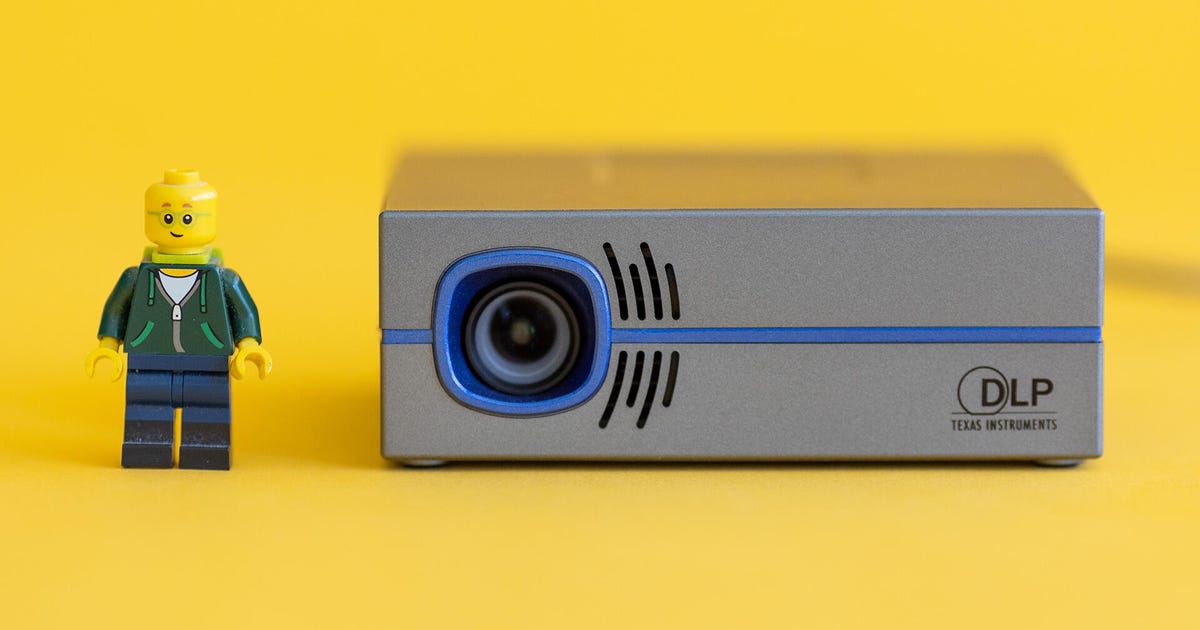
The tiny P8 performs far bigger than its size suggests. Though in fairness, the hand-held size doesn't suggest it could project an image at all. It looks more like a toy. But it's reasonably bright, has a built-in speaker and only costs $250. Impressive.
It doesn't have a battery, nor does it have any streaming apps. So you'll need to take that into consideration. It does have an HDMI input and a USB connection, so you can connect a streaming stick and get all the streaming apps you could possibly want.
There are brighter options and better-looking options, but for the price the P8 is hard to beat.
Check out our full review of the AAXA P8..
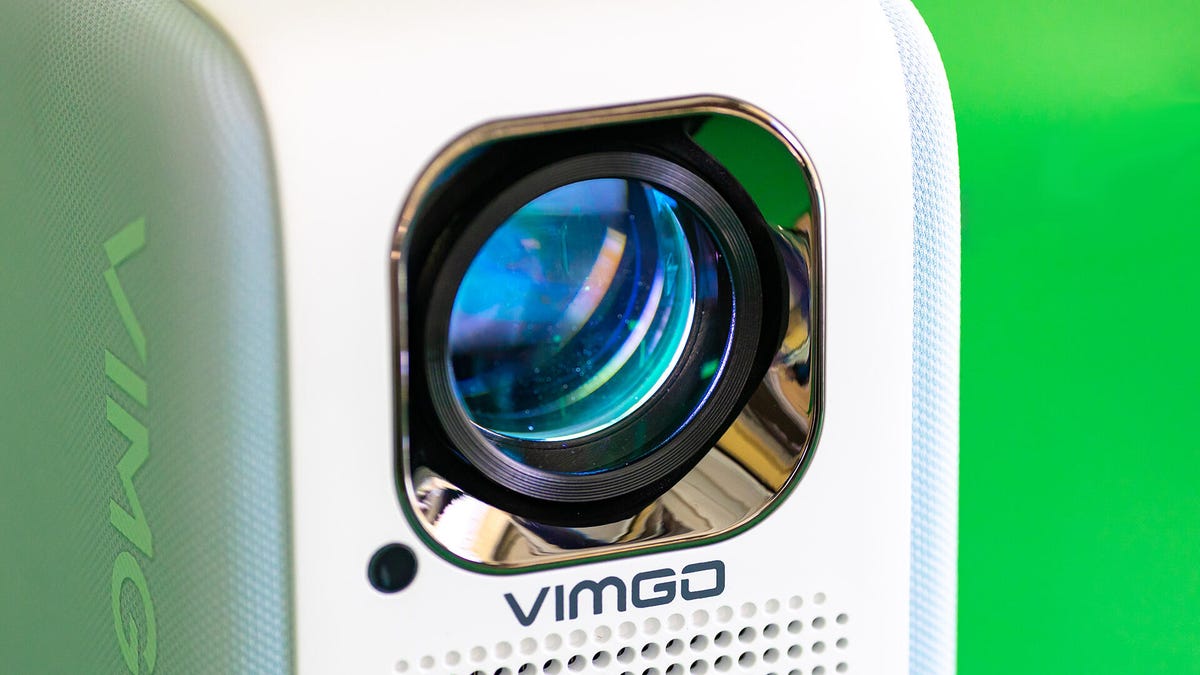
The Vimgo P10's price fluctuates between $170 and $250, in the same ballpark as the AAXA P8. It's a lot larger than the P8, the largest cheap projector we've tested actually, making it far less portable. It's still "small" compared to full-size and more expensive projectors, however.
Picture quality is better than the P8 in some ways, worse in others. The P10 has a great contrast ratio and decent brightness, but the color is remarkably terrible. The center of the image is noticeably sharper and brighter than the rest of the image. It's not great.
But the price is. A perfectly watchable image for around $250. It even has Netflix built in. Impressive.
Read our in-depth review of the Vimgo P10..
Other products we've tested
LG CineBeam PH30N: The LG PH30N is tiny -- even smaller than the AAXA P8. It's not particularly bright, doesn't have built-in apps, and the battery doesn't last as long as the AAXA P6X, though it is a bit cheaper. Read our LG CineBeam PH30N review.
How we test cheap projectors
There is very little difference in how we test cheap projectors compared to more expensive projectors. A $250 projector goes through the same tests as a $5,500 projector. Obviously we don't expect them to perform as well, nor do we condemn them for their inevitable performance discrepancies. In fact, we applaud any projector that can create a watchable image for the cost of a good pair of headphones.
For more, check out How We Test Projectors.
Cheap projector FAQs
Can something this cheap really make a big image?
Yes, though manage your expectations. The marketing around these tiny projectors is full of over-the-top superlatives. Can you create a 100-inch image? Technically yes, but it's going to be really dim.
All the ones we've listed can create a watchable big TV-size image, and some can do even more.
Do any cheap projectors have streaming built in?
Yes, sort of. Some models have a few streaming apps, like Netflix. None have the easy-to-use interface and plethora of apps like you'd find on a modern TV. It's a bit hit-or-miss.
That said, all the ones we recommend have HDMI inputs, and most have a USB connection, so you can connect and power a streaming stick to get the "smart TV" interface you're used to.
Source
Tags:
- Best Cheap Projector For 2022 How Much Are Eligible Employees
- Best Cheap Projector For 2022 The Cms
- Best Cheap Projector For 2022 Double Cab
- Best Cheap Projector For 2022 Toyota
- Best Cheap Projector For 2022 Stop
- Best Cheap Projector For Gaming
- Best Cheap Projector For Powerpoint
- Best Cheap Projector For Movies
- Best Cheap Projector Screen
- Best Cheap Projector Youtube
- Best Cheap Projector For Gaming
- Best Cheap Wine

8 Affordable Therapy Options That Don't Require Insurance
Every year, more Americans seek cognitive behavioral therapy and counseling to prioritize their mental health and overall wellbeing. Unfortunately, with the growing cost of living and an uncertain economic outlook, many therapy-goers find it difficult to afford treatment – even with insurance or other financial assistance programs.
Things are even more challenging for those looking for affordable therapy without insurance. For these folks, a single therapy session can cost as much as $250, which isn't feasible in most households.
However, there is some good news. These days, uninsured people looking for affordable therapy have more options than ever, including sliding scale payments, employer-sponsored programs and mental health apps.
Below, you'll find several cost-effective ways to access cheap or free therapy, none requiring insurance. Read on to discover how to find affordable therapy that works for you.
Read More: 6 Best Teas for Anxiety and Stress for 2022
Affordable therapy options to try without insurance
Sliding scale payments
Since therapists set their prices, they can choose to reduce their rates for patients with lower incomes or those who don't have insurance. Also known as a sliding scale, this payment system is set up at a therapist's discretion and can often decrease therapy fees by half or more (depending on a patient's income).
On the plus side, sliding scale payments can help economically disadvantaged people access therapy at a rate proportionate to their income. However, since mental health professionals make less money on these types of patients, these appointments are in high demand -- and often difficult to find.
To find a participating practice, you can use a therapist search engine (like Psychology Today or GoodTherapy) and apply the filter for sliding scale payments.
Low-cost clinics
Another way to access affordable therapy without insurance is by visiting a low-cost clinic. These are generally run by local universities or hospitals, where students train to become mental health professionals. They often provide affordable (or even free) counseling as a way for their trainees to get real-life experience with patients under the supervision of qualified professionals.
Low-cost clinics are an excellent option for those who don't have insurance or can't cover the out-of-pocket costs of traditional therapy. Keep in mind that the staff at these clinics usually aren't fully qualified yet, so they won't have as much knowledge or experience as an experienced therapist.
If you're interested in finding a low-cost clinic near you, contact your local university or psychology institute and ask if they offer student-led therapy services.
Employee Assistance Program
Some companies have an Employee Assistance Program for workers struggling with mental health issues. With these types of programs, the employer will typically pay for a certain number of therapy sessions or mental health services to help with things like stress, anxiety, depression, substance abuse, trauma and grief.
One of the biggest benefits of an EAP is that your employer covers all the costs. On the downside, EAPs are designed to focus on specific, short-term concerns rather than long-term mental health. As such, they aren't a solution for complex or extensive issues.
To find out if your company offers EAPs, reach out to your manager or your human resources department. If you qualify, they should be able to give you information about how to access a therapist that's covered by your EAP.

Community mental health centers
Across the country, you'll find government-run community centers where individuals can receive mental health support -- no matter their income or insurance status. These clinics provide a range of services, including crisis assistance, substance abuse counseling and mental health care for veterans, with many accepting Medicaid or offering sliding scale payment options.
One advantage of community mental health centers is that they're available to everyone and deal with a comprehensive variety of conditions and disorders. Because of this, the centers' resources are often stretched thin, and you may face a lengthy wait to see a therapist.
Your state's behavioral or mental health department can help you access these services. In Missouri, for example, you can use this map to find your nearest community mental health centers based on your county.
University services
If you're in college, you might be able to access therapy through your school's health center. Universities and community colleges recognize that students deal with all kinds of mental health issues while they're in school and put programs in place to support their pupils. For instance, the University of Michigan offers professional and peer-to-peer counseling, therapy apps, wellness coaching, self-guided meditation and more.
On the positive side, these university-sponsored services are often included with tuition. However, they're typically meant for short-term help. If you need long-term therapy, your school's counselor will likely refer you to another mental health professional outside the university.
Visit your school's website or contact the administration team to learn more about therapy and mental health services.
Group therapy
Group therapy is a cost-effective alternative if you don't have insurance and can't afford individual therapy. Instead of meeting with a mental health professional by yourself, you'll come together with a therapist and a small group of people dealing with similar issues like stress, depression, grief, substance abuse or something else.
On average, group therapy costs around $30 to $80 per session – about half the price of individual therapy. It also lets you connect with others who are in a similar situation as you. On the downside, you won't receive one-on-one attention from your therapist, which could be difficult if you deal with highly personal issues. Plus, for group therapy to be effective, you'll need to be comfortable discussing your mental health in front of multiple others.
To learn more about group therapy or find sessions near you, search online or reach out to a local therapist specializing in your area of concern (such as addiction, chronic illness, trauma or another area).
Support groups
Similarly, support groups provide a safe space for people who are going through a similar experience. They're led by peers (rather than therapists) and are free to attend. For example, Al-Anon is a support group for friends and families of people with alcohol use disorder who want to gather and discuss how their loved one's addiction has affected them.
One of the key advantages of support groups is that they're organized and attended by people with first-hand experience with whatever you're struggling with -- whether that's substance abuse, grief, stress or another challenging issue. But since support groups are run as peer-to-peer sessions, they don't provide the opportunity to dive deeply into your personal situation with the help of a qualified therapist.
As mentioned, support groups are focused on a single topic, so the best way to find a relevant group near you is through online research (for example, "cancer support groups in Denver"). If you'd prefer to meet virtually, there are also plenty of free online support groups that tackle all sorts of tough issues.
Mental health apps
Thanks to technology, mental health care is now accessible from anywhere and for everybody -- including people who live in rural areas, individuals with disabilities and people without insurance. For about $60 to $90 per week, online therapy apps like Talkspace, BetterHelp and Cerebral allow you to speak with a therapist from the comfort of your home.
These virtual mental health services are ideal if you're unsure about meeting a mental health professional face-to-face or if you can't find a therapist near your home. On the other hand, you might find it harder to connect or develop trust with your therapist in a virtual setting. On top of that, the subscription fees for these apps can be pricey.
To learn more, check out CNET's reviews of the best online therapy services and mental health apps.

Does free therapy exist?
Unfortunately, therapy can still be expensive, even with discounts or sliding scale payment options. While there are a handful of ways to access free online therapy or in-person counseling appointments, they're often hard to find. If you don't have a budget for individual therapy right now, you may find the following resources helpful.
- Warmlines and hotlines: If you need to talk to someone at a given moment, consider calling a mental health support line (known as a warmline or hotline). Both are free phone numbers you can dial to chat with a peer or volunteer trained in mental health. Warmlines are available for casual, non-emergency conversations, whereas hotlines like the National Suicide Prevention Lifeline are for urgent crises (dial or text 988).
- Free clinics: From student training clinics to community mental health centers, you may be able to find facilities in your area offering free therapy. Some mental health professionals also offer several pro bono sessions every week or month. These services are typically set aside for low-income and uninsured patients.
- Support groups: No matter what you're struggling with, chances are that you're not alone. To meet people in a similar situation, research local or virtual support groups that revolve around your particular mental health concern.
Bottom line
These days, there are several pathways to find affordable therapy without insurance as a result of advances in mental health technology. Whether you're insured or not, there are many ways to find cost-effective mental health care, including low-cost clinics, group therapy, community centers, support groups and mental health apps.
The information contained in this article is for educational and informational purposes only and is not intended as health or medical advice. Always consult a physician or other qualified health provider regarding any questions you may have about a medical condition or health objectives.
Source
Tags:
- 8 Affordable Therapy Options That Don T Require Insurance For Gun
- 8 Affordable Therapy Options That Don T Shed Non Shedding Dogs
- 8 Affordable Therapy Options That Don T Kill Me Can Only Make Me Stronger
- 8 Affordable Therapy Options Th at Don T Befront Me
- 8 Affordable Therapy Options That Don T Make No Sense
- 8 Affordable Therapy Options That Donkey
- 8 Affordable Therapy Options That Trade
- 8 Affordable Therapy Options That Students
- 8 Affordable Therapy Near
Twitter Expands Direct Message Search to More Than Just Names
Twitter users can now search their direct messages using names and keywords, the company said Wednesdy in a tweet. The new capability allows people to find past conversations, even if they don't remember who they had them with.
Until now, Twitter's direct message search let people pull up conversations only by a user's name.
A quick test shows that a keyword search will return not just the conversation in which it appears, but multiple mentions within that conversation.
Source
Tags:
- Direct Message On Twitter
- Twitter Direct Message Link
- More Content On My Twitter
- Direct Message On Twitter
- Details Expand Twitter Meaning
- Direct Message On Twitter
- Twitter Direct Message Settings
- Direct Message In Twitter
- Twitter Detail Expands Meaning
- What Is Detail Expands On Twitter

Blast zombies with a DIY flamethrower fueled by cornstarch
When the zombies begin their quest for world domination, Ivan Owen will be ready. Owen has built a fully functional DIY flamethrower out of a battery-powered leaf blower, a blowtorch and a flour sifter, and the contraption runs on dry ingredients commonly found around the home.
Things like cornstarch, non-dairy powdered creamer, flour and several other dried goods can be put in the attached flour sifter, and as you sift the dried ingredients into the tube, the leaf blower shoots them through to the torch. The torch sets the dried goods ablaze so they can set anything in front of you, like a zombie or a piece of paper, on fire.
The whole thing is put together using custom 3D-printed pieces, so anyone looking to replicate Owen's creation will need the schematics from Owen to make it work. It's probably a good thing Owen is keeping those plans secret for now, however, as the last thing the world needs is millions of people wielding flamethrowers.
In the video above, you can see that the flamethrower was able to set a few of the paper zombies on fire, though we think it would need a little more power to help Owen survive a zombie apocalypse. Still, it's a good start, and Owen is at least a bit more prepared than you and I to ward off an onslaught of the undead.
(Via Laughing Squid)
Source
Tags:
- How To Build A Homemade Flamethrower
- How To Make A Flamethrower
- How To Build A Homemade Flamethrower
- How Do You Make A Flamethrower
- How To Make A Homemade Flamethrower
- How To Build A Flamethrower Gun
- How To Make A Zombies
- Blast The Zombie Animated Game
- How To Create Zombies
- Zombie Blast Crew Review
- What Is A Zombie Attack

Volvo Will Test Wireless EV Charging in Sweden for 3 Years
Wireless EV charging seems like a technology that is always a few years from being commercially viable, given how fast battery capacities and wired charging speeds are improving nearly every year. But many companies are determined to prove its viability, and Volvo is gearing up for a major test along those lines.
Volvo on Wednesday announced that it will evaluate a fleet of XC40 Recharge electric SUVs using wireless charging in Gothenburg, Sweden, over the next three years. The cars will be driven upwards of 12 hours per day, and Volvo estimates each car will accumulate some 60,000 miles each year. In addition to testing the wireless chargers themselves, Volvo will also use this pilot program to evaluate how its small electric vehicles handle commercial use.
Momentum Dynamics will supply the charging stations, which will be integrated into Gothenburg's Green City Zone, which is treated as a test bed of sorts for burgeoning clean-vehicle technology. The chargers can provide up to 40 kilowatts of juice, which is pretty close to the 50-kW DC fast chargers many EV owners are used to. To ensure charging is properly established, the fleet of XC40s will use their surround-view camera systems to line themselves up with the chargers, which will be embedded in parking spaces.
"Gothenburg Green City Zone lets us try exciting new technologies in a real environment and evaluate them over time for a potential future broader introduction," said Mats Moberg, head of R&D for Volvo Cars, in a statement. "Testing new charging technologies together with selected partners is a good way to evaluate alternative charging options for our future cars."
Wireless charging isn't just limited to stationary vehicles. In the US, both Indiana and Michigan are looking into the viability of wireless charging roads, which would be able to juice up your EV while it drives down the highway. The two Midwestern states will start with dedicated patches of test pavement, but if it all goes well, both have plans to implement the tech on actual roads to determine durability and longevity.
Source
Tags:
- Volvo Will Test Wireless Ev Charging In Sweden Form
- Volvo Will Test Wireless Ev Charging In Sweden For Mother
- Volvo Will Test Wireless Ev Charging In A Condo
- Volvo Will Test Wireless Ev Charging Technology
- Volvo Will Test Wireless Everything
- Volvo Will Test Wireless Speed
- Volvo Will Test Wireless Internet
- Volvo Will Testicular
- Volvo Will Testator
- Leikin Volvo Willoughby
- Liken Volvo Willoughby

Zagg seeks to rival Apple Care with its own mobile protection plan
Zagg's cases and screen covers have been protecting phones for years. This week, the InvisibleShield maker unveiled Zagg Protect, a repair and protection plan.
For an annual fee of $99, you can get up to two incidents of accidental damages covered per year, including cracked screens and liquid damage. The plan also covers failure of a phone's battery, headphone jack, touch screen, speakers, camera and more. Each repair still requires a $49 deductible.
The plan offers an alternative to protection plans like Apple Care Plus and Samsung Care Plus. It covers both new and used phones from most major smartphone makers, the company said in a release.
An Apple Care Plus plan will vary in cost depending on the iPhone model and may be cheaper than Zagg's plan. Zagg Protect's $49 deductible for all repairs is cheaper than Apple Care Plus' $99 charge for accidental damage repair, though a screen repair is only $29 with Apple's service. Samsung Care Plus ranges from $4 to $13 month depending on your device. Samsung's repair fee for the most likely types of accidental damage is a hefty $249, though some screen repairs are $29.
Zagg Protect will cover used phones, as long as they're running Android OS using Chrome browser version 68 or newer, or iOS 11 or newer with Safari or Chrome. Apple Care Plus must be added within a year of purchase of an eligible iPhone or sooner depending on location. Samsung limits eligibility to 60 days after purchase.
Source
Tags:
- Zagg Products For Iphone
- Zagg Apple Watch 7
- Zagg For Ipad Air
- Zagg For Ipad Air
- Zagg Products For Iphone
- Zagg Ipad 4th Generation
- Is Zagg Going Out Of Business
- Did The Zags Win
- W ho Are The Zags
- Did The Zags Win Tonight

Gas Is Still Expensive: 9 Driving Tips to Conserve Fuel and Save Money
The national average gas price continues to lower each day -- it's currently $4.11 per gallon, which is down from $4.80 one month ago -- but it's still not cheap. So to make your tank of gas last a little longer (and save you some money, too) there are some driving tips that can help, and also a few myths that you should steer clear of.
From forgoing the air conditioning while driving to shutting your car off completely at stop lights to changing your air filters more often, we'll explain what works and what doesn't.
We'll share some tips for saving gas while driving, as well as myths to avoid. In addition, here's how to save money on gas at the pump.
Gas-saving myths that really aren't helping
Skip these suggestions -- they don't really work and may waste your time and money.
Don't buy a device marketed to help with fuel efficiency: Often called fuel economizers, these devices are installed in your engine and tout fuel savings. But we don't recommend them. "People should be suspect of any device that promises to increase fuel efficiency," Patrick De Haan, head of petroleum analysis at Gas Buddy, told CNET. Some may circumvent emissions and could be illegal.
Don't change your air filter more often than recommended: While a dirty air filter can cause problems for other areas of your vehicle, it won't change your gas mileage.
Don't schedule more frequent oil changes: It's a common myth that if you're due for an oil change, your car's gas mileage will suffer. While it's best to keep up with your car's maintenance to prevent future problems, don't expect your gas mileage to improve.
Your mileage may improve by 1% to 2%, however, if you use the manufacturer's recommended grade of motor oil.
Now that you know what won't work, here are some tips that can improve your mileage.
Slow and steady wins the race
Fast acceleration burns gas at a quicker rate than driving at a slower, more consistent pace. If you can maintain a constant speed, it will help you save gas. People who are constantly rushing and pressing on the gas pedal tend to consume more gas because of rapid acceleration, De Haan explained.
"If people drove at a slower pace of acceleration and avoided racing through a red light, it would help them prevent [...] burning through gas and using energy," he said.
Vehicles are most efficient when you're driving between 55 and 60 miles per hour -- anything above that starts to deplete a car's efficiency. "Slow down and go 60 instead of 70," De Haan said.
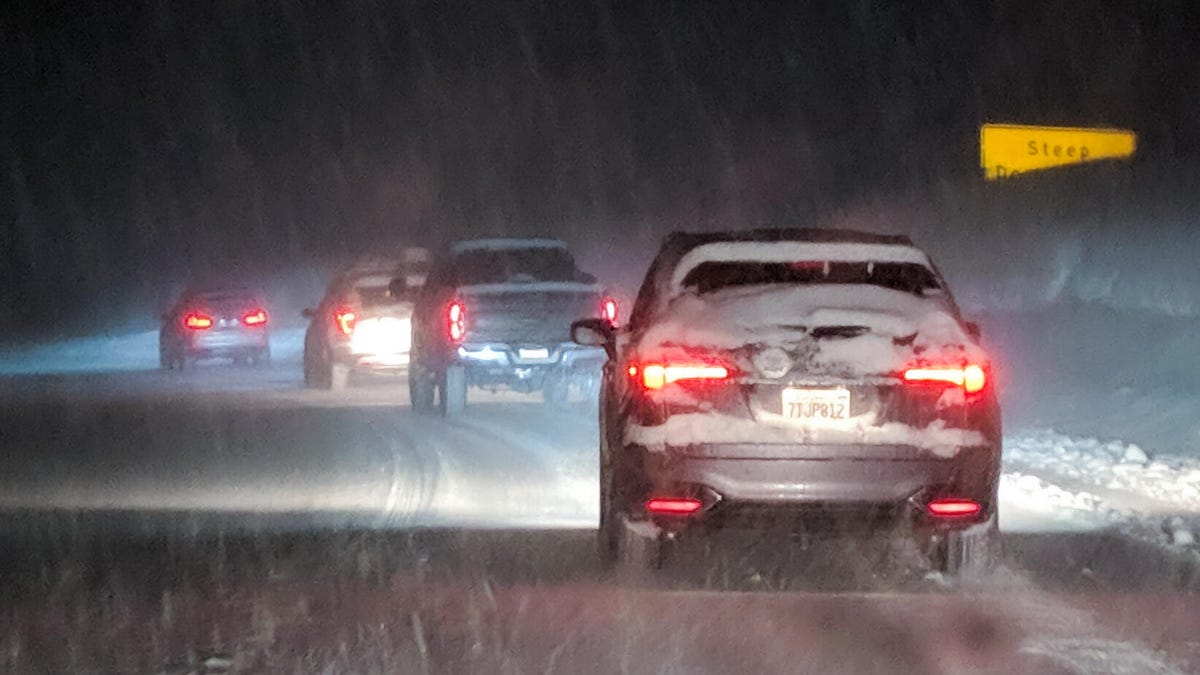
Your driving pattern affects your gas mileage.
James Martin/CNETUse cruise control when possible
The easiest way to maintain a constant speed? Cruise control. It's an easy way to maintain a constant speed, instead of slowing down and speeding up to get back to 55 miles per hour. It's best to use cruise control when you're driving on a flat road with no stops -- for instance, a highway.
"Cruise control is much more effective than a human is at maintaining speed and can help save fuel," De Haan said.
Avoid idling: Turn off your car at red lights and other long stops
When you pull up to a busy red light that generally takes several minutes to get through or if you're stopped and waiting outside of your kids' school, the Argonne National Laboratory recommends turning off your car if it'll be idling for 10 seconds or longer.
The government agency says that even turning your car off for as briefly as 10 seconds can save you fuel and reduce carbon dioxide emissions.
For diesel vehicles, however, the advice isn't the same. De Haan says that engines run based on compression so it may not be as advantageous to turn off your diesel vehicle while idling.
Know when to use air conditioning and when to open windows
Turning off the air conditioner in your car can save gas, but not in all driving situations. Having the AC on while the vehicle is already running doesn't add much stress to your engine, and won't cause you to use gas at a much faster rate. But when your car is idling, running the AC can place more of a load on the engine, requiring more gas to help it work harder, said De Haan.
Is driving with the windows down a more fuel-efficient alternative? Not always, especially when on highways or driving at higher speeds. This can actually use more gas as it increases the wind resistance, or "air drag," according to Schaefer Autobody Centers. This, in turn, slows your car down and requires more fuel to run.
It's typically best to leave windows open when driving around city streets where you may be idling more often or streets with lower speed limits. Otherwise, using the air conditioner is your best option.
Take racks off your car when not in use
If you drive a vehicle that has removable racks on the top, De Haan advises taking them off when you're not using them. This can boost your car's aerodynamics, similar to rolling up your windows.
This logic applies to larger racks that hold luggage, for instance, but bike and ski racks are generally OK to leave on your vehicle.
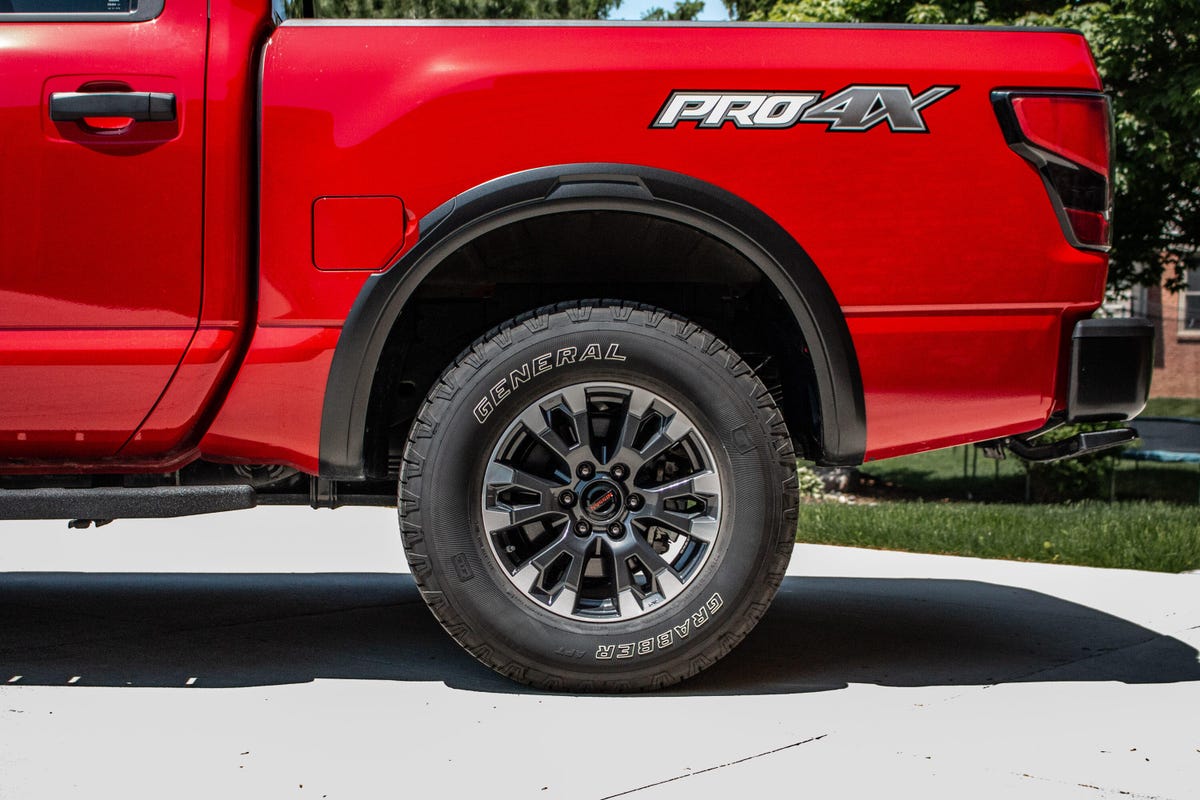
Always make sure your tires are properly inflated before hitting the road.
Jon Wong/CNET CarsKeep your tires inflated properly
Making sure your tires are properly inflated can also help with your car's gas mileage. The US Department of Energy says you can improve your gas mileage by 3% (though the average is 0.6%) by keeping your tires inflated at the correct air pressure. Your gas mileage can lower by roughly 0.2% for every 1 pound per square inch of air dropped. For instance, if your tires are supposed to be aired up to 36 PSI and they're sitting at 30 PSI, your gas mileage could reduce by as much as 1.2%.
When the air pressure drops below 25 PSI, an increase in friction can occur, forcing your engine to work harder, resulting in fewer miles per gallon, De Haan said. Most engines will alert you when one of your tires is low. (The warning light looks like closed parentheses with an exclamation mark in between and a squiggly line underneath.)
Before airing up your tires, check the manufacturer requirements in your owner's manual or the door sticker in your car to see what the air pressure needs to be. If you can't find either, you can visit a website like TirePressure.com to get an answer.
Combine your trips when running errands
If you have multiple errands to run on opposite sides of town, plan it so that you aren't driving back and forth. For instance, if the post office is next to the coffee shop but the post office isn't open yet, make that your last stop instead of having to drive back to that area.
When you do have to run errands at places that aren't nearby, it's best to try to do everything in one trip. Your car's engine is more efficient when it's warmed up, which can save you slightly on gas. It also prevents you from driving additional miles by taking trips on different days.
Anticipate stoplights as much as possible
Hitting multiple stop lights in a row can wreak havoc on your gas mileage, especially if you're idling at each light. Your car is still burning fuel while you're stopped and you're getting zero gas mileage during that time.
While it's best to try to time lights when they're green to avoid stopping, this isn't always possible. If you see the light has already turned yellow or red, slow down and coast to the light instead of using the gas pedal and then braking hard when you get there. This can help you save a little bit of gas.
Does automatic start-and-stop technology boost your mileage?
Many newer cars are equipped with a start-and-stop technology that automatically activates when you come to a complete stop and when you press the gas pedal. These systems automatically turn off the engine when the car is completely stopped -- your AC and other electronics will continue working. As soon as you press the gas pedal, the engine immediately kicks back on.
Vehicles with this automatic system see up to a 7% improvement in fuel economy, according to AAA. If your car is equipped with this feature, you're already saving gas without doing anything extra.
For more money saving tips, here are 27 ways to cut costs around the house now and a trick to lower your electric bill. Also, here are some tips to save money on food, gas and travel.
Source
Tags:
- Gas Is Still Expensive 9 Driving Tips To Prevent
- Gas Is Still Expensive 9mm
- Gas Is Still Expensive 90 S Basketball
- Gas Is Still Expensive Whiskey
- Gas Is Still Expensive Purses
- How Much Oil Is Still In Texas
- How Much Oil Is Still In The Earth
- What Gas Is Produced During Photosynthesis
Dji phantom 3 4k review phantom 3 4k and inspire 1 propellers dji phantom 3 4k review phantom 3 4k and inspire me home dji phantom 3 4k review phantom 3 4k and inspire uplift dji phantom 3 4k review phantom 3 4k and hdr dji phantom 3 4k review phantom 3 4k and 5k dji phantom 3 4k review phantom 3 4k battery dji phantom 3 4k review phantom 3 se
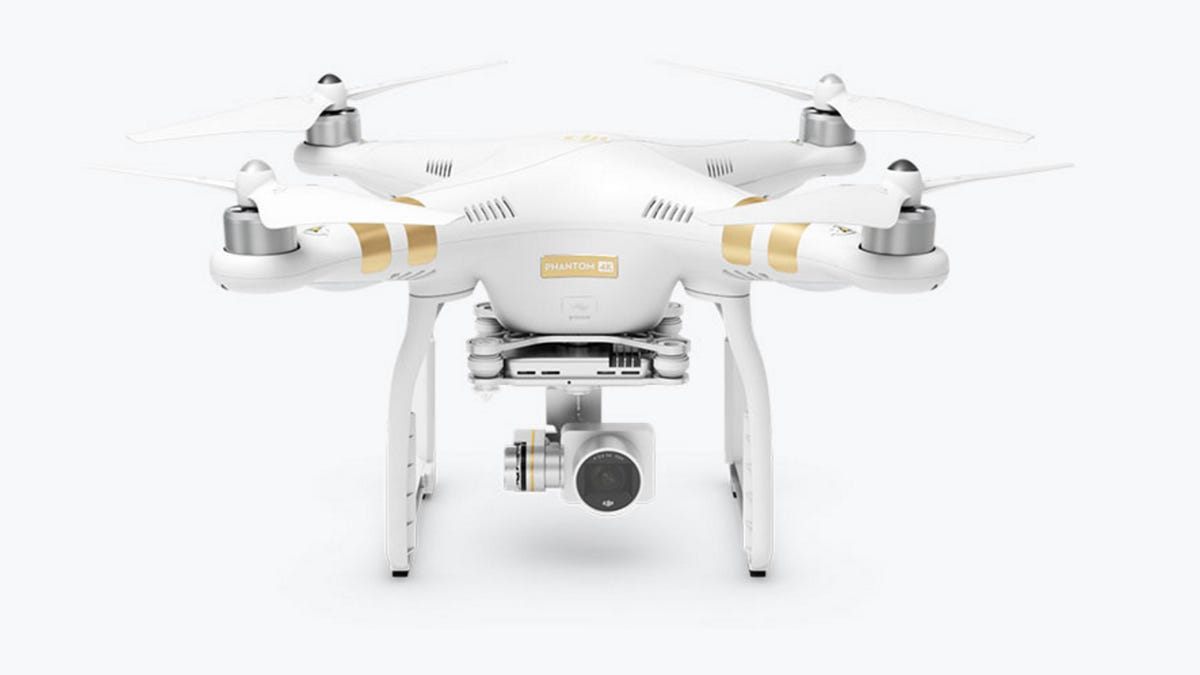
DJI Phantom 3 4K review: Phantom 3 4K and Inspire 1 Pro Black Edition add variety to DJI's drone lineups
DJI had a pretty big 2015, releasing some of the best camera drones available with its Phantom 3 line, as well as new cameras for its ready-to-fly professional model, the Inspire 1. It's kicking off 2016 by tweaking those models a bit with the Phantom 3 4K and the Inspire 1 Pro Black Edition.
The Inspire 1 Pro Black Edition is just what it sounds like. Instead of the white body and controller of the original model, this new one is black with a black controller. DJI says it's inspired by high-end filmmaking equipment. Like the $4,500 original, it comes with the company's Micro Four Thirds Zenmuse X5 interchangeable lens camera. Unlike the original, it's priced at $4,800.
The $999 DJI Phantom 3 4K is essentially the same as the current Phantom 3 Professional except that its controller uses a 2.4GHz Wi-Fi video downlink from the quadcopter with a range of up to 1.2km (0.75 mile). The Phantom 3 Professional uses DJI's Lightbridge technology, which has a more reliable connection and a range up to 5km (3.1 miles). UK and Australian details weren't forthcoming, but $999 converts to around £680 or AU$1,390.
You can see how the Phantom 3 4K stacks up against the rest of the line on DJI's site or just order it now.
See all of CNET's coverage of CES 2016 here.
Source
Facebook exempt from fcc facebook reported facebook reported germans to merkel facebook reported earnings

Facebook reportedly exempted high-profile users from its rules
Facebook reportedly exempted millions of high-profile users, including celebrities and politicians, from some or all of its community standards, apparently contradicting the social network's public statements that its rules apply to everyone.
The Wall Street Journal, citing internal documents, reported Monday that the world's largest social network created a program known as Cross Check, or XCheck, that shielded public figures from the company's rules against harassment and incitement to violence. The documents, for example, revealed that Facebook allowed Brazilian soccer player Neymar da Silva Santos Jr. to post nude photos of a woman who accused him of rape before it pulled down the content, according to the report. Some high-profile users who were exempted from content moderation enforcement shared false claims, including about vaccines.
An internal review of Facebook's practices from 2019 stated the company "was not actually doing what we say we do publicly." The XCheck program also included most government officials but not all candidates running for office, according to the report. In 2020, at least 5.8 million users were reportedly part of XCheck.
Facebook has faced criticism from both Democrats and Republicans about what content it leaves up or pulls down. The documents will likely raise concerns again about whether the social network is fairly enforcing its rules. The company formed a content oversight board to review some of its toughest decisions.
Citing a post from 2018, Facebook spokesman Andy Stone said in a tweet on Monday that the program was meant to give certain Facebook pages and profiles a "second layer of review to make sure we've applied our policies correctly."
"There aren't two systems of justice; it's an attempted safeguard against mistakes," he said in the tweet.
Facebook's oversight board said in a tweet it recommended that the company "be far more transparent in general, including about its management of high-profile accounts, while ensuring that its policies treat all users fairly."
Advocacy groups and some of Facebook's most vocal critics called for more oversight over the social network.
"Urgent government regulation is needed to ensure the online world is one in which human rights are effectively protected. These disclosures underscore the fact that we simply cannot rely on companies to self-regulate," said Agnès Callamard, secretary general of Amnesty International, in a statement.
Source
Steam on chromebooks how do you use accents can you use steam on chromebooks steam online how to install steam on chromebook steam on chromebook steam on ps4 how to download steam on pc

Steam on Chromebooks: How to Play PC Games on Chrome OS
One of the biggest knocks against Chromebooks is that they're no good for gaming. There are Android games, but not all of them work. You can use a cloud gaming service such as Google Stadia and Nvidia GeForce Now, but that generally requires a subscription. But Google's been working on a bigger solution with help from game-maker Valve.
A prerelease version of Valve's Steam game store is now available to try on Chromebooks through the Chrome OS Dev channel. It's an early, alpha-quality version of Steam, so anything can break. Be prepared to face crashes, bugs and performance problems, Chrome OS Product Manager Zach Alcorn said in a community forum post. From my first-hand experience, this is 100% true but I haven't experienced anything too bad. Due to the instability of the alpha version, though, it's best not to test it out on a Chromebook you rely on for work or school and you'll want to make sure all important files are backed up before proceeding.
Also, it can currently only be enabled on a select set of Chromebooks with higher-end components:
Even if you have one of these models, the Chromebook will need to have the following components:
- An 11th-gen Intel Core i5 or i7 processor (Core i3 configurations are not supported)
- At least 8GB of RAM (16GB recommended)
- Intel Iris Xe Graphics
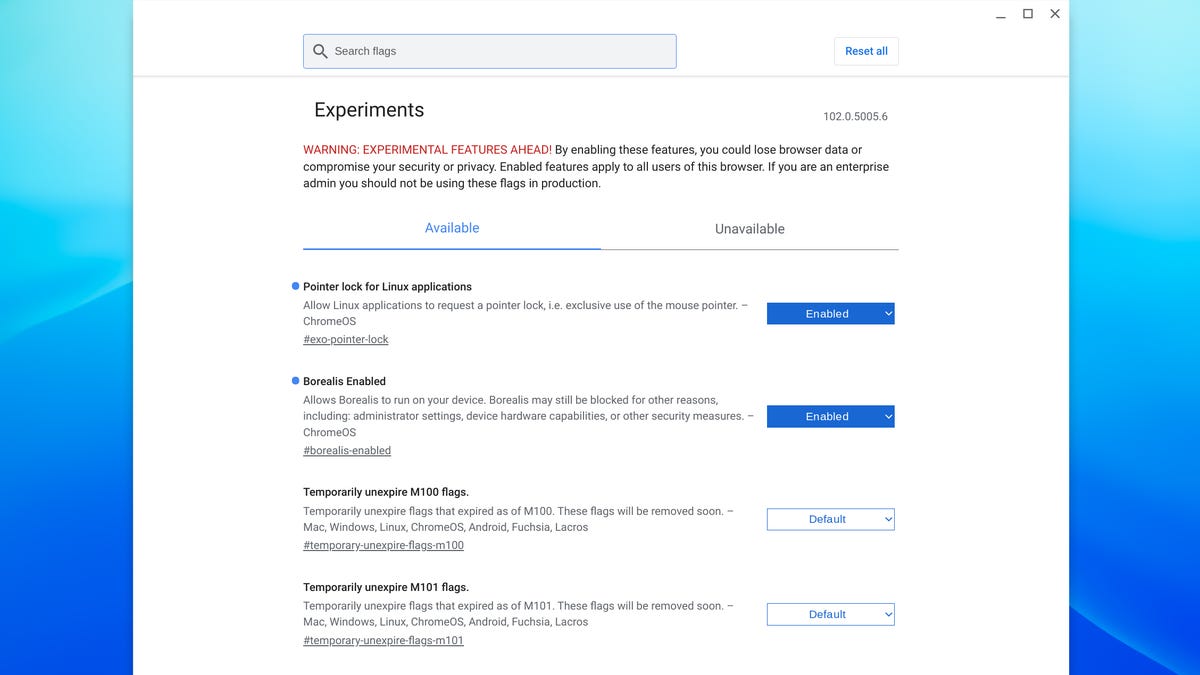
Steam on Chrome is in alpha and requires enabling a couple of experimental features.
Screenshot by Josh Goldman/CNETIf you have one of these Chromebooks, you can access the alpha-quality version of Steam on Chrome OS. You'll have to switch to the Dev channel in your settings menu. Once the Chromebook is updated to that channel, follow these steps to get set up:
- Open a browser window and navigate to chrome://flags
- Search for #borealis-enabled and #exo-pointer-lock and set both to Enabled
- Open a crosh terminal (Ctrl+Alt+T)
- Enter "insert_coin volteer-JOlkth573FBLGa"
- Follow the setup process to install Steam
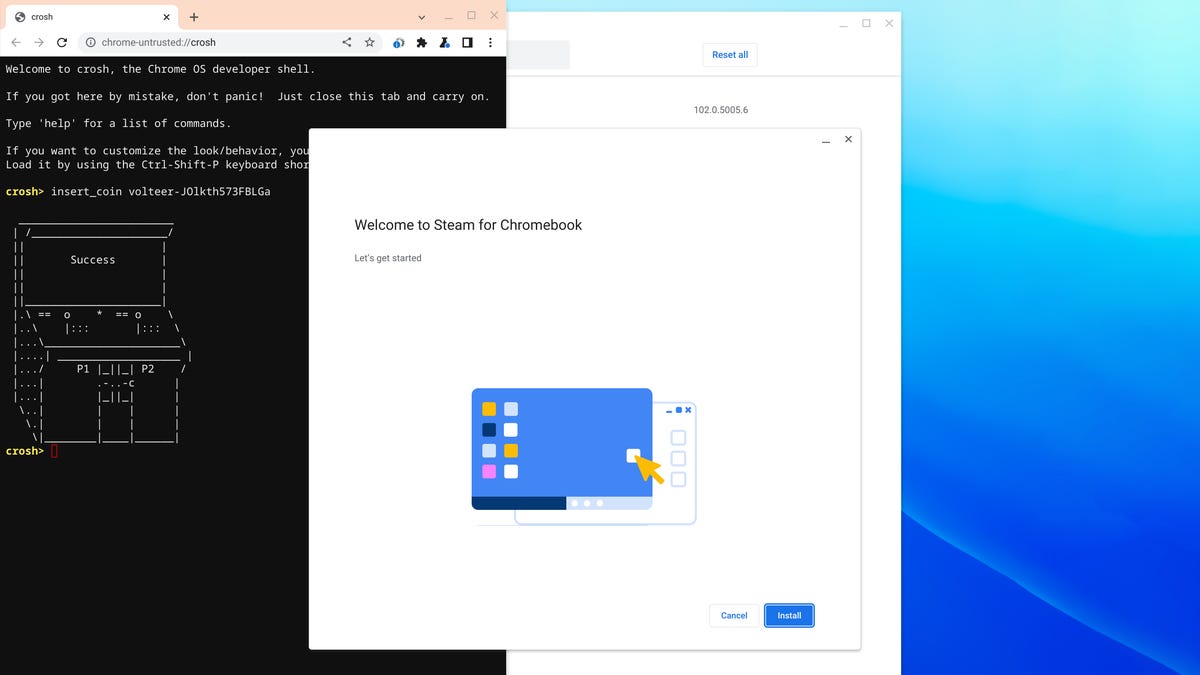
Once the install screen opens, just follow the prompts and you'll be gaming in no time.
Screenshot by Josh Goldman/CNETGoogle has the full install instructions on the Chromium.org forums. You'll also find a list of known issues as well as all of the games currently supported. It's a surprisingly long list, including Portal 2, Dota 2, The Witcher 3: Wild Hunt, Stardew Valley, Terraria, Hades, Age of Empires II: Definitive Edition and The Elder Scrolls V: Skyrim Special Edition.
When available, Chrome OS will run the Linux version of games. Other games use Steam Play's compatibility tool called Proton. It's also used for the Steam Deck handheld gaming device. Although I experienced some glitchy behavior before and after playing, the gameplay itself was actually fairly smooth on the Acer Chromebook 713 I tested with, paired with the excellent Steelseries Stratus Plus Bluetooth controller for Chromebooks and Android.
If you're shopping for a Chromebook right now and thinking you might want to use Steam once it's finished and ready for the public, you'll want to keep the system requirements listed above in mind. Also, make sure you get an SSD large enough to store your games. Chromebooks typically don't have high-capacity storage drives but Steam support might change that soon.
Source
How to troubleshoot your sony tv remote control how to troubleshoot your garbage disposal how to troubleshoot your home thermostat how to troubleshoot a computer how to troubleshoot printer how to troubleshoot air conditioner how to troubleshoot my hp printer is not printing how to download youtube videos

How to troubleshoot your Echo Wall Clock
Recently, Amazon stopped selling its Echo Wall Clock temporarily due to a pretty major glitch. Turns out, some customers are having trouble connecting the clock with Alexa speakers. Without this connection, the Echo Wall Clock is, well, just a clock.
If you're one of those people who can't get your clock to work, no need to send it back and wait until new clocks to start shipping. Here are some simple fixes that might correct the problem.
Check the batteries
If your Echo Wall Clock will tell time, but won't show timers from Alexa, CNET's own Rich Brown found a quick fix. Apparently, the batteries that come with the clock aren't the best.
Try using a fresh set of batteries or taking out the Amazon batteries and putting them back in. Both solutions fixed the connectivity issues for Brown. If the LED turns blue, everything should work perfectly.
If you decided not to use batteries and you're still having this problem, try unplugging the power cord for 30 seconds and plugging it back in to reset the clock.
Try resetting Bluetooth
Disconnecting your clock from Bluetooth and pairing it again may be the trick you need. Go to the Alexa app, tap on the Devices icon on the home screen, select your clock and tap Forget Device. Then, go to Menu > Settings > Device settings > Connected Devices > Echo Wall Clock > Unpair.
Now that your clock is removed, you can re-pair it. Say, "Alexa, set up my Echo Wall Clock," to your Alexa device. Then place the clock in pairing mode by pressing and holding the blue button on the back of the device for 10 seconds.
The LED light on the front of the clock will turn orange when it's ready to pair. When it turns blue, that means it is successfully paired with your Alexa device.
From there, the clock will set itself to the right time and sync with your Alexa device. This can take a few minutes, so be patient. When all of that is done, the LED light will turn off and everything should work like it's supposed to.
Turn off Multi-Room Music
Alarms and timers won't display on your Echo Wall Clock if it is paired with a speaker in a Multi-Room Music group. You'll need to remove the speaker from the group for the clock to work properly.
To remove the speaker without ruining your group, go to the Alexa app, tap the Devices icon> Your Smart Home Skills > Speaker Groups. Find the speaker you want to unpair. Then, tap Unpair Speaker System. The clock should now display your alarms and timers.
How to use Alexa's new Wait feature
Amazon Echo screen won't show your security camera feed? Here's how to fix it
Source
